Many designers, friends and students alike, have asked me since forever how to build a portfolio (and where), and consequently how I built mine. Which tools did I use. How long did it take me. Should I use Wix? WordPress? Behance? And I always say the same:
It’s complicated.
Because I have strong opinions. And I hate to repeat myself. So here we are.
Perhaps you’re one of these people, or maybe you’re a complete stranger (how the hell did you get here?), but in any case, here’s what you’ll find here:
Arguments to build your own stuff. Free technologies to do so. Someone to talk about it. Motivation. Comradery.
No tutorials nor tricks to sell you anything. No BS copywriting.
This is the first post of this brand new blog, so it only makes sense to explain how the thing was built and what I learned on the process. And what can you get out of it, too.
The short answer
Jekyll + GitHub Pages + Obsidian . 12 bucks per year for a domain registered on NameCheap1.
Just tell that to your stupid AI agents and they’ll build it for you. But that’s not what we’re here for.
In short, Jekyll is a site generator. A landing page, as you may already know, is generally built with some flavors of HTML, CSS and JavaScript.
Jekyll uses all that to turn your Markdown files into a site, and it’s surprisingly easy to set up, even for a humble designer like yours truly.
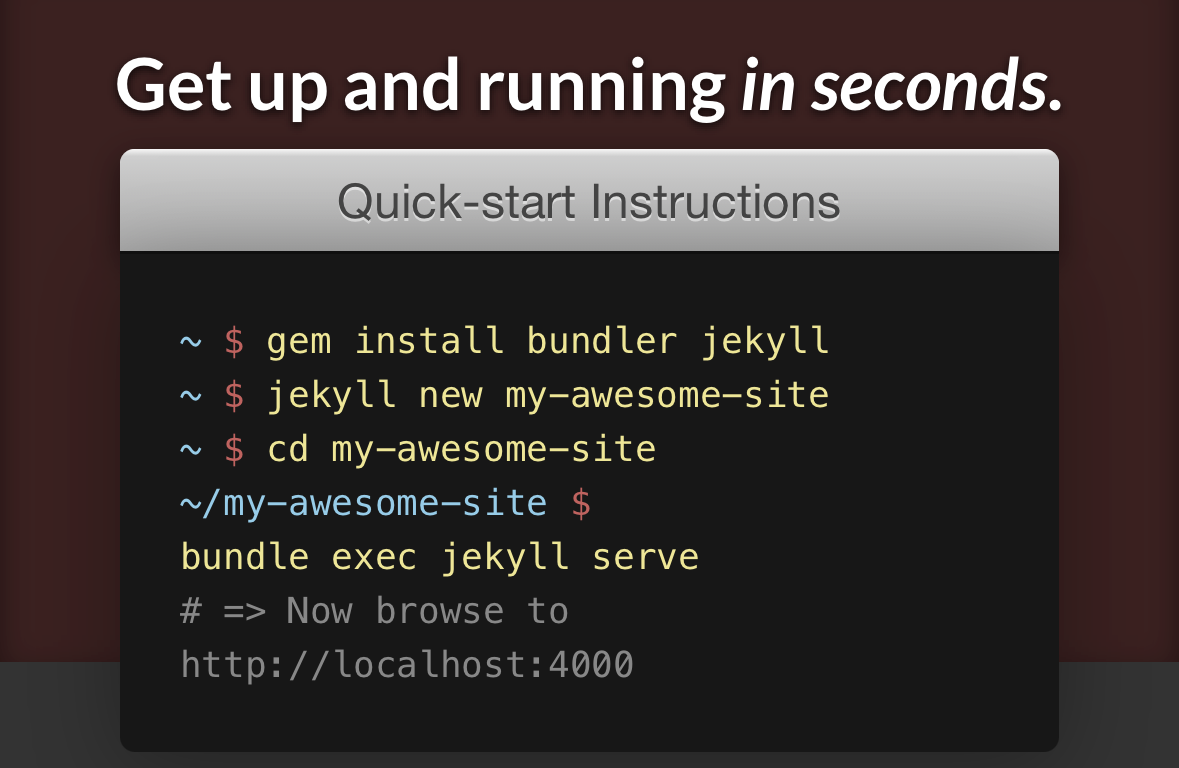
Those Markdown files can be created in basically any tool, but I use Obsidian as my text editor and PKM (or however the hell we call it these days)
I can use Obsidian from my Mac, iPhone and iPad. I’m actually writing this on my phone, from my couch. For free. Isn’t that cool?
But why these tools and not others!?
Why Obsidian? Because it’s free and I own my files. And this feature is absolutely wild:
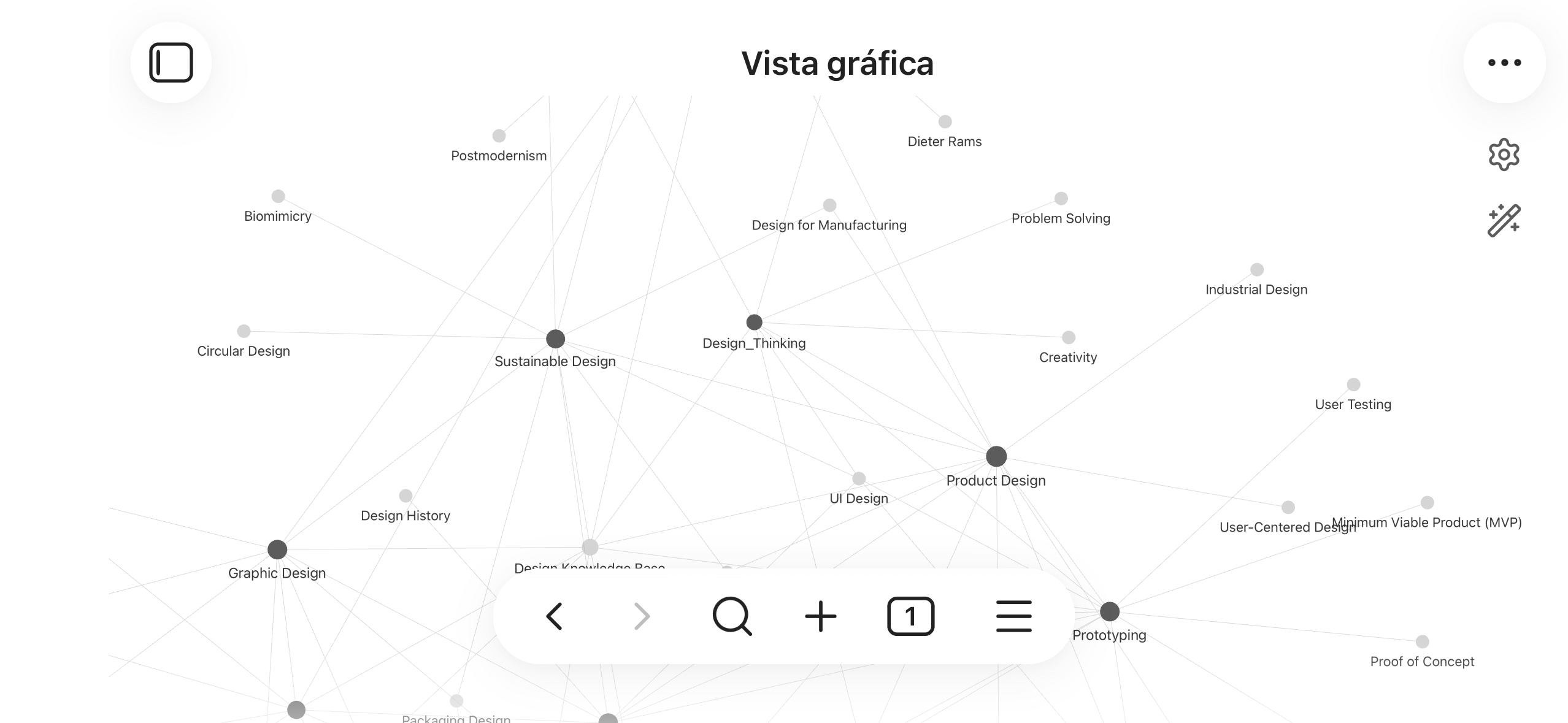
Why Jekyll? Cause it works. And I like it.
Why am I not using a newer, flashier framework/tool?
Who cares. Really.
This is like the Sketch v Figma debate from a few years ago. Just use what’s best for you/your team/your context.
You’re not going to be “left behind”, specially if you’re a designer.
I’ve seen two dozens of tools that look like Jekyll, work like Jekyll and are better than Jekyll for x or y reason: Astro, Gatsby, Next.js, Hugo, Eleventy… new stuff comes out all the time.
Pick the one that looks less daunting to you and crack on. There’s always time to migrate or to learn new stuff down the road if needed. Our goal now is to build something to put our stuff out there.
GitHub Pages was built for Jekyll, so that’s one less problem.
Owning instead of renting
But why not just use Wix or WordPress or Behance, then?
Well, I like to build things my way. To make them look exactly how I want them to look. To understand how they work. To express myself.
This is my little corner of the Internet, after all.
And because I hate paying a monthly fee for stuff I can build myself while having fun, too.
Don’t know how to code? Neither do I. I just read the docs. Buy a template. Break things. You can ask AI for help, sure, but we’ll miss the point if we ask it to build it for us.
There was no AI when I first built this site a few years ago under a different, long forgotten name. It’s doable. It only takes patience and some spare time.
I want to be fair here: Wix and Squarespace and the rest are perfectly valid choices, especially if you don’t have a technical background. They get you from zero to a live site in a couple hours.
But if you do work in tech (or are planning to do so) without a technical background, what a wonderful excuse to start building one.
I understand that convenience is quite valuable in the era where in order to even be considered hireable you need to be (or at least appear to be) productive all the time and constantly putting things out there.
And I say this as a father and a worker. I know. Convenience is valuable indeed, but it can also harm you in the longer term, because it’s a doubled-edged sword.
One of its side effects is called deskilling. So be careful.
Building and maintaining your own site, even slowly, is how you hold on to it. Today I might be able to build this whole thing from scratch without a template, because I’ve spent enough time messing with it.
The time you invest in perfectioning it, fixing its bugs, creating with(in) it is not wasted, it’s literally the opposite (I said investment on the first place didn’t I)
The backbone
This site is built on Clancy, a Jekyll theme built by a guy called Artem Sheludko. It comes packed with features for only ~80 bucks.
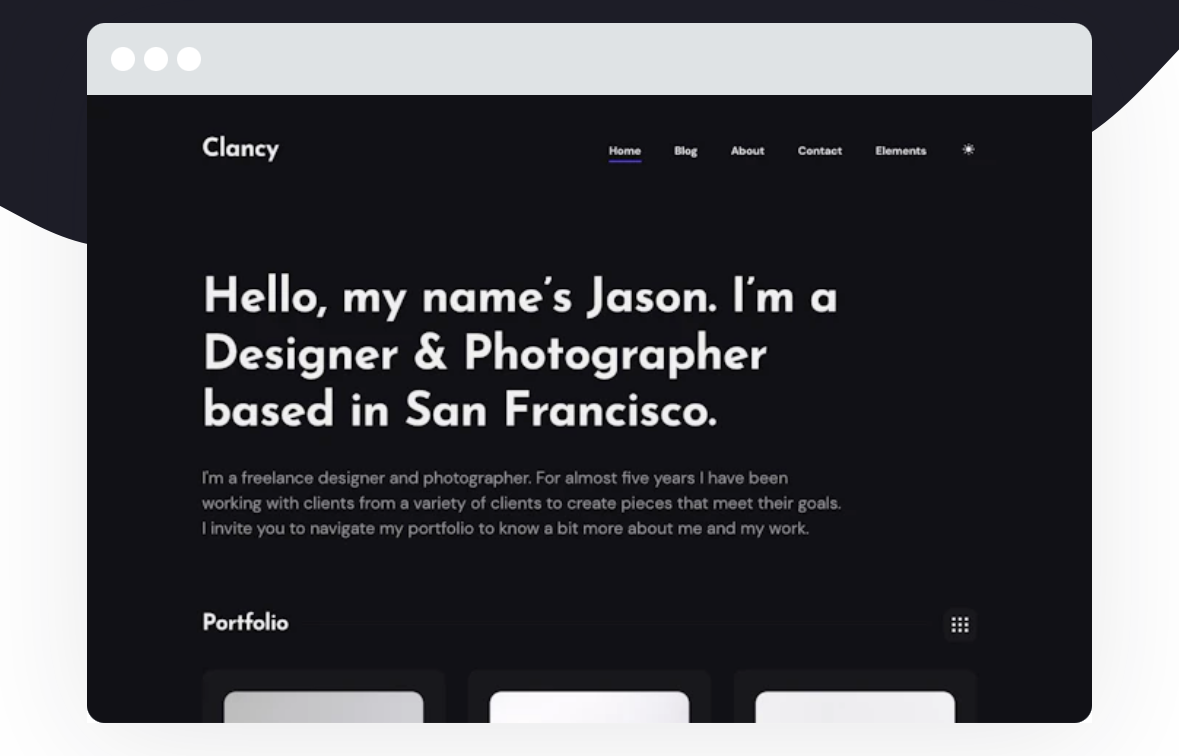
Setting up the backbone of a project (the grid, the type system, the responsive behavior…) sucks.
Of course I want a responsive typography system, but I’d rather “just” define the values I want to use than doing that and also write classes for every style on every breakpoint.
Also opening that theme was like opening a good Figma file where you first learn how to nest components, or that good old (now obsolete) :slot trick for the very first time.
I love reverse engineering stuff, man. I really do.
No AI at all then?
I mean, I burned one billion tokens this year alone. I routinely send 10 minute voice notes to my Hermes agent to structure my thinking. I ask it to audit my content, to do research for me… to do automated QA when I develop something new for my coffee app, too.
So yes, I use it now to tinker with this site.
I’m not saying don’t use AI, I’m saying be careful. Because it’s convenient. It literally makes you dumber. And the companies spearheading its expansion are doing horrendous things.
I believe in a different model, but that’s for another post.
My point for now is: be smarter. Tinker. Learn. I trust in you.
I’m dead serious.
The non technical part
This is called how to build a portfolio, but so far we’ve only discussed tools, tech and philosophy; nothing about strategy or content design yet.
Let’s add a bit of that too.
Pick your audience
Think about who actually reads your portfolio. For most of us, it isn’t another designer admiring our craft (are you? I’m blushing) — it’s a hiring manager, skimming twenty portfolios in a morning, looking for a reason to call you back.
So choose what you add for them. If the site is meant to convert (to get you a conversation) lead with the thing that earns that conversation, not the thing that proves you’re clever.
And decide deliberately what belongs on it and what doesn’t. Do you want a section for experiments and half-finished things? I do: I call mine Playground, and it’s there for other tinkerers too.
Just know why it’s there, and who it’s for.
Oh, and if your portfolio is not for hiring managers (or not only for them), this advice is equally valid, because what I’m saying is: design for the audience you want to reach, whatever that is.
Sounds obvious, but we often forget it, so there’s no harm in repeating it a few more times.
This blog exists for me to sharpen my thinking (and maybe help you out in the process too), and it’s part of my Portfolio cause for me it’s all one and the same.
My writing skills are, in a way, my design skills.
Show don’t tell
There might be a shift in how designers are presenting their work right now, and in what the market demands.
For years the formula was: narrate the process, discovery, personas, wireframes, iteration… It’s what schools and bootcamps have taught for a decade, and it’s why so many portfolios read as completely interchangeable.
And a big chunk of that was fake. I’ve hired designers. I’ve been a teacher. I know y’all lie. It’s ok.
Well, it was.
What you hear now is: what did you build, how, why, and what ideas do you still have?
That’s in part why I wrote this. Launching some crappy app with Lovable and get some real world usage data might look impressive for a while, but the real thing that will stay with you forever is starting to wrangle with the terminal right now.
I’ll never forget the day my friend Carlos saw me frustrated trying to use XAMPP and said: hey, why don’t you use npm run dev?
That said, I understand the pressure to make your projects look successful, but this is like dancing: if you focus on the joy of doing it, people will see your passion and tenacity, not only the fact that you’re just pretending to know how to dance salsa (meaning: your project sucks)
Mistakes will just be a natural part of it, because their lacking in case studies has always been a bit suspicious, if you ask me.
One last thing
I got really good advice from my friend Helena a few years ago, and I want to share it with you too.
Everyone knows you have to get past the software that filters résumés — the ATS, the keyword scanner, the gate before a human ever looks.
But optimizing only for that, turning your CV or your site into something surgical and professional and entirely free of personality, is missing the point.
She told me to put a bit of myself into it (not literally, for God’s sake): the fun facts, the family, the random bits. The little things that have nothing to do with “professional experience” and everything to do with whether someone actually wants to work with you or not.
Designers forget this, because we often treat content like something clinical. You want to sound and look like Apple, but turns out you’re a dude (yes, I’m talking to myself)
Your portfolio doesn’t have to be a sterile, official document. It’s also a place where you get to express yourself freely!
And I too hope I get mine to look more like me, step by step. In Spanish we say “consejos vendo, pa’ mi no tengo”
Now, back to designing things. More posts soon.
-
That’s what I pay the Internet cartel(s) for my domain ↩